
- Key Highlights You Should Know
- Important Dates You Should Remember
- Official Update From UPSSSC
- Why Candidates Should Not Ignore the Provisional Answer Key
- Examination Structure at a Glance
- How to Check Answer Key Correctly
- How to Calculate Expected Marks
- Common Mistakes While Raising Objections
- Step-by-Step Guide to File Objection Online
- Documents Required During Objection Submission
- Provisional vs Final Answer Key – Key Differences
- What Happens After the Objection Window Closes?
- What to Do After Final Answer Key?
- Action Checklist Before Final Submission
- FAQs – Questions Candidates Search at Night
- Official Links – Verified
- Related Articles
The provisional answer key for the Assistant Statistical Officer and Assistant Research Officer recruitment exam is out. It came a day after the exam held on 26 July. Therefore, you can now download the official response sheet from upsssc.gov.in and file objections online till 3 August.
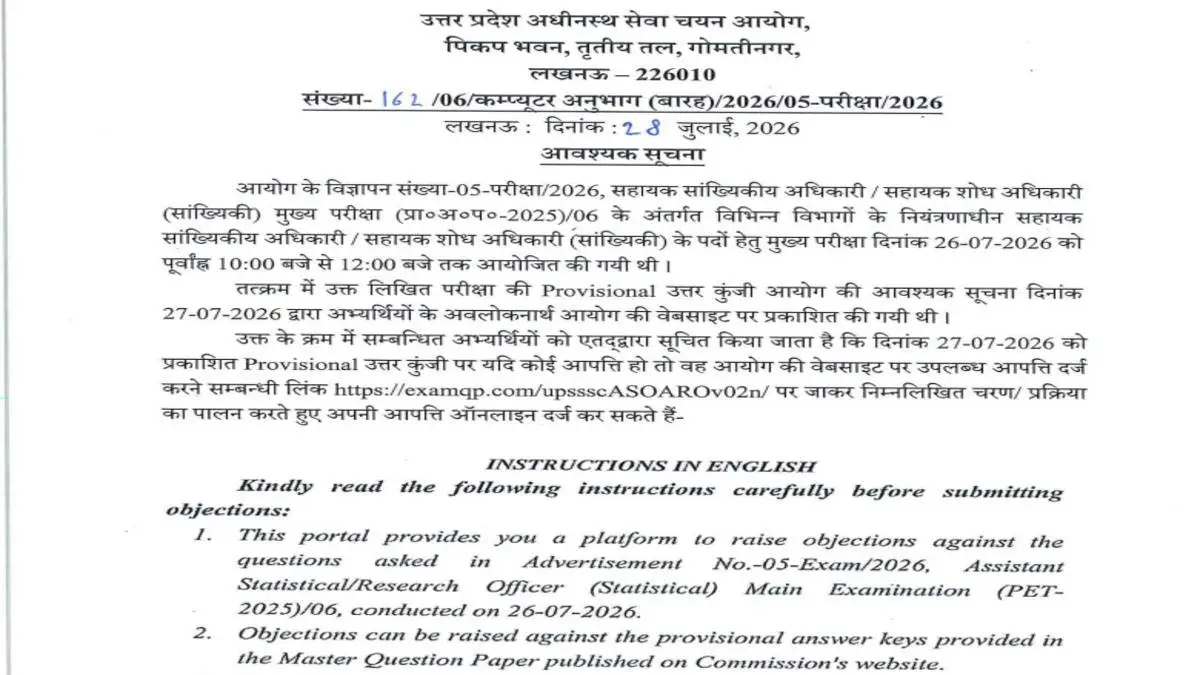
UPSSSC ASO ARO Answer Key 2026 official objection notice – Provisional key released on 27 July, objection window open till 3 August 2026
Key Highlights You Should Know
| Parameter | Official Detail |
|---|---|
| Commission | Uttar Pradesh Subordinate Services Selection Commission (UPSSSC), Lucknow |
| Examination | Assistant Statistical Officer / Assistant Research Officer (Statistics) Mains (PRA.A.P.-2025)/06, Advt. No. 05-Exam/2026 |
| Exam Date | 26 July 2026, 10:00 AM to 12:00 PM – Offline |
| Provisional Key Release | 27 July 2026 on upsssc.gov.in |
| Objection Notice | No. 1611/06/Computer Anubhag (Barah)/2026/05-Pariksha/2026 dated 28 July 2026 |
| Objection Portal | https://examqp.com/upssscASOAROv02n/ |
| Last Date | 03 August 2026 – Portal closes automatically |
| Fee | Rs. 100 per question, PDF less than 5MB, one-time filing |
Important Dates You Should Remember
| Event | Official Date / Status |
|---|---|
| Mains Exam | 26 July 2026 – Conducted |
| Provisional Key Release | 27 July 2026 – Published |
| Objection Notice Date | 28 July 2026 – Notice No. 1611/2026 |
| Objection Last Date | 03 August 2026 – Officially confirmed |
| Final Answer Key | Officially not announced |
| Result Date | Commission has not notified yet |
Official Update From UPSSSC
OFFICIAL INFORMATION
As per official notice dated 28 July 2026, UPSSSC conducted the main examination under Advt. No. 05-Exam/2026 on 26-07-2026 from 10:00 AM to 12:00 PM. Later, the provisional answer key appeared on the Commission website on 27-07-2026 for viewing.
Where to File Objection
You can file objections only online through the official link. For this, you need Roll Number, Registration Number, Date of Birth and Captcha to login. After login, the Instructions page will open. Then you should select the checkbox and click CONTINUE.
After that, click Proceed to raise Question paper objection. Then select the question and your answer, and enter description. Additionally, upload proof as PDF less than 5MB, pay via PAY NOW, and finally save summary via View/Print Objection Summary.
However, UPSSSC will not accept objections sent through post. Similarly, once you complete payment, you cannot edit your objection. Moreover, question sequence is as per provisional key on website, not as per your individual set.
Why Candidates Should Not Ignore the Provisional Answer Key
Concise Answer: Provisional key is not final. Final merit depends only on final key. If your objection is valid, answer may change or question may be removed. Therefore, you should check master paper and file objection with valid proof.
Why Final Merit Depends on This Stage
UPSSSC conducts this mains exam only after PET shortlisting. As a result, competition is limited to shortlisted candidates. Consequently, one mark can change rank a lot.
In past UPSSSC recruitments, the final key changed after review. For example, if objection was valid, answer changed or question was removed as per past practice. Meanwhile, UPSSSC has not confirmed revision rules for this exam in current notice.
Examination Structure at a Glance
| Parameter | Detail |
|---|---|
| Duration | 2 Hours (10 AM – 12 PM) |
| Total Questions | 100 MCQs – As per advertisement pattern |
| Negative Marking | 0.25 – As per advertisement pattern |
| Mode and Shifts | Offline, Single Shift |
| Objection Fee | Rs. 100 per question – Officially confirmed |
| Total Vacancies | Officially not announced in this notice. Refer to Advt. No. 05-Exam/2026 |
| Selection Stages | PET Shortlisting – Mains – Document Verification – Final Selection |
How to Check Answer Key Correctly
Most candidates make a mistake here. They match answers with their own set A/B/C/D directly. However, UPSSSC says sequence is as per master question paper on website. Therefore, your Set A Q1 may be Master Paper Q47.
- Firstly, download master question paper along with provisional key from upsssc.gov.in.
- Secondly, map your attempted questions to master paper numbers before calculating marks.
- Finally, use master numbers while filing objection. For trend reference, you can check UPSSSC Cutoff 2026 category wise analysis.
How to Calculate Expected Marks
As per advertisement pattern, each question carries 1 mark. For every wrong answer, UPSSSC deducts 0.25. The objection notice does not mention marking scheme, so you should use advertisement for estimation.
For example, formula is: Expected Score = (Correct × 1) – (Incorrect × 0.25)
Common Mistakes While Raising Objections
Many candidates face rejection due to small errors. Therefore, you should know common mistakes to save your fee and effort.
- Using your set question number instead of master paper number. Portal shows master sequence only.
- Paying for one question and leaving, then trying to add another question later. You can file only once, so add all questions before PAY NOW.
- Leaving description box empty and only uploading PDF. Description is a must for review.
- Uploading JPG instead of PDF or file larger than 5MB. This leads to upload failure.
Documents and Technical Errors to Avoid
- Waiting till last evening of 03 August when server load is high. As a result, payment may fail. So file early.
- Using mobile browser for payment. Instead, use laptop with Chrome incognito mode to avoid cache issues.
Step-by-Step Guide to File Objection Online
- Open official objection portal and login with Roll Number, Registration Number, Date of Birth, Captcha.
- On Instructions page, select checkbox and click CONTINUE.
- Click Proceed to raise Question paper objection.
- Select question, select your answer, and enter description with reason and source.
- Upload proof as PDF less than 5MB – one PDF per question.
- Pay Rs. 100 per objection via PAY NOW. Add all questions together before payment because you can file only once.
- Finally, view and save summary via View/Print Objection Summary as PDF.
Documents Required During Objection Submission
You need PDF less than 5MB as proof. For instance, strong proof includes NCERT textbook page with book name and edition visible, government reports like Census or UP Economic Survey with cover page, and standard books with author and page number.
On the other hand, weak proof like Wikipedia, private blogs, screenshots without source name, handwritten notes, or coaching PDFs without details are generally not valid.
Provisional vs Final Answer Key – Key Differences
| Feature | Provisional Key | Final Key |
|---|---|---|
| Objection Allowed | Yes, till 03 August 2026 | No |
| Can Be Revised | Yes | No, final for result |
| Used For Score Estimate | Tentative score | Final score |
| Used For Result | No | Yes |
What Happens After the Objection Window Closes?
After 03 August 2026, the portal will close automatically. Then UPSSSC will review only objections received through official online link. Subsequently, an expert committee will check objections.
If committee finds objection valid, it may revise answer or remove question as per past practice. Then UPSSSC will publish final key and prepare result on that basis. No objection is allowed against final key. This process is similar to UPSSSC Technical Assistant Recruitment 2026 where final key comes after review.
What to Do After Final Answer Key?
Final answer key and result dates are officially not announced in notice dated 28 July 2026. Therefore, you should check upsssc.gov.in regularly for updates.
Meanwhile, keep your document verification documents ready. These include graduation marksheet showing relevant subject, NIELIT O Level certificate, domicile, caste/EWS certificate with valid date, and PET score card. You can also track upcoming jobs in UP Govt Jobs 2026 Full List and Today Sarkari Result 2026.
Action Checklist Before Final Submission
1. Master paper numbers matched correctly 2. PDF less than 5MB per question, one question per PDF 3. Description with master question number, official answer, your answer, source name written 4. All questions added together – Remember one-time filing only 5. Summary PDF saved after payment
FAQs – Questions Candidates Search at Night
Provisional answer key was released on 27 July 2026 for exam held on 26 July 2026 as per official notice dated 28 July 2026.
Last date is 03 August 2026 as per Notice No. 1611/2026 dated 28 July 2026. Facility closes automatically after that. Official PDF: UPSSSC Official Notice PDF.
Fee is Rs. 100 per question, to be paid online via PAY NOW on objection portal.
Only online at https://examqp.com/upssscASOAROv02n/ . UPSSSC will not accept objections sent through post.
No, once you complete payment, you cannot edit objection as per official instructions.
Only PDF format and size less than 5MB is accepted. Therefore, you should upload one PDF per question with clear source details.
Yes, you can file for one or more questions. However, you must add all questions in one session before payment because filing is allowed only once.
Do not press back button. Wait for 20-30 minutes and check View/Print Objection Summary. Summary will show if objection is recorded.
Final answer key and result dates are officially not announced in notice dated 28 July 2026. Consequently, you should check upsssc.gov.in regularly.
Deletion policy is officially not announced for this exam. As per past UPSSSC practice, if UPSSSC deletes a question, it generally gives marks to all candidates. However, official confirmation is awaited.
Official Links – Verified
| Purpose | Official Link |
|---|---|
| Official Notice PDF – Notice No. 1611/2026 | UPSSSC Official Notice PDF |
| Objection Portal – Official | Objection Portal Link |
| UPSSSC Official Website | upsssc.gov.in |
Related Articles – UPSSSC Cluster
- UPSSSC Cutoff 2026 category wise analysis – For expected marks comparison
- UPSSSC PET 2025 Vacancy Increased to 2516 Posts – For PET shortlisted context
- UPSSSC Excise Constable Recruitment 2026 – 722 Posts
- UPSSSC Technical Assistant Recruitment 2026
- UP VDO Exam Complete Guide
- UP Govt Jobs 2026 Full List
- Today Sarkari Result 2026 Live Updates
Final Verdict
The provisional answer key stage is your only chance to ensure fair evaluation. Therefore, check master question paper sequence carefully, calculate expected marks with negative marking, and file objection only with strong proof in one session before 03 August 2026.
Additionally, save summary PDF and keep DV documents ready while waiting for final key. Finally, for all official updates, refer only to upsssc.gov.in.